
You can reach the WebWork support team from the app, in the chat, or from the website. Support works through tickets, chat and email; it takes no phone calls.
Open a support ticket
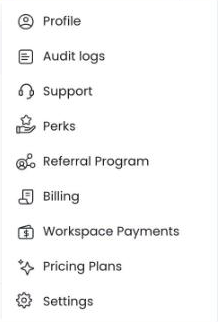
- Click your profile picture at the top right and select Support.
- Click + New ticket.
- Enter a Subject and choose a Topic. For Time Tracker, also choose a Sub-topic and your Operating system; for Subscription & Billing, choose a Sub-topic. Describe your issue, and if you like, attach screenshots with + Add file.
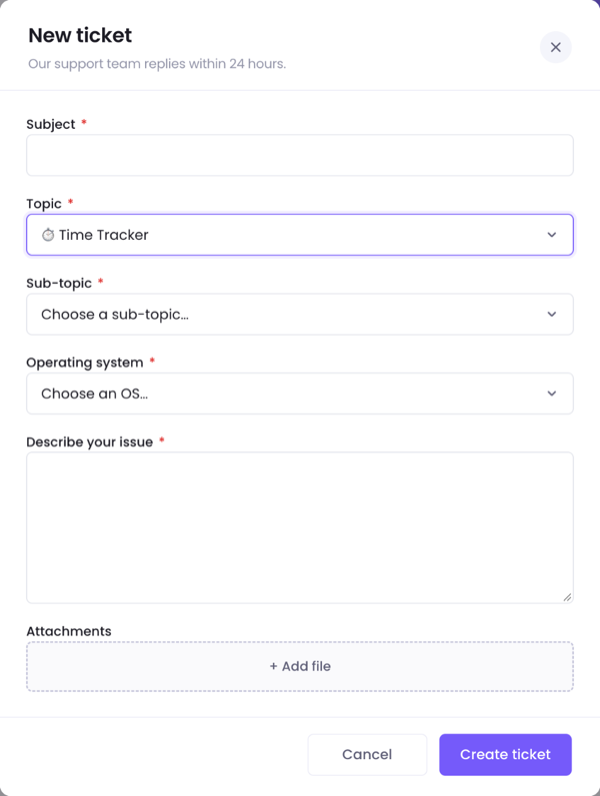
- Click Create ticket.
The support team replies within 24 hours. Your tickets stay on the Support page, under Active and Closed. The same page links Suggest a Feature for an idea rather than a problem. To submit an idea or vote for one, see How to suggest a feature and see what is new?
Chat with support
If the app shows a chat button at the bottom right, click it. Otherwise, open Live Chat on the website’s Contact page. An AI assistant answers first. If the chat shows Talk to a person or Have a person reply, click it to ask for a person from the support team.
Write from the website
The Contact page also has a form, Drop Us a Message, and the email address contact@webwork-tracker.com. The phone number on that page reaches the sales team, not support.
What to include
- The email address you sign in with, and the workspace you work in.
- The app you use, the web app, the Desktop App or a mobile app, and its version.
- What you did, what you expected, and the exact message you saw.
- Screenshots, and for the Desktop App an error log, as How to send error logs? shows.
Write from the email address of your account when you can. Support may ask you to verify your identity before a sensitive account change; Security & Sensitive Account Changes explains how, including when you can no longer reach that email. For a sign-in problem, start with How to reset your password and fix sign-in problems?
Was this article helpful?
Thanks for your feedback.