
You can suggest a feature for WebWork on the website’s Feature Requests page, vote for the requests of other customers and follow the status of each request. What WebWork is building is on the Product Roadmap, and what it has released is in the Changelog.
Reading the three pages needs no account. Submitting a request and voting need you to be signed in to WebWork: when you are signed out, Submit and the vote take you to the WebWork login page. All three pages are linked in the website’s footer.
Submit a feature request
Check first whether the request exists: on the Feature Requests page, type its words in Search a request. When it exists, vote for it instead of adding it again.
- On the Feature Requests page, click Add New Request.
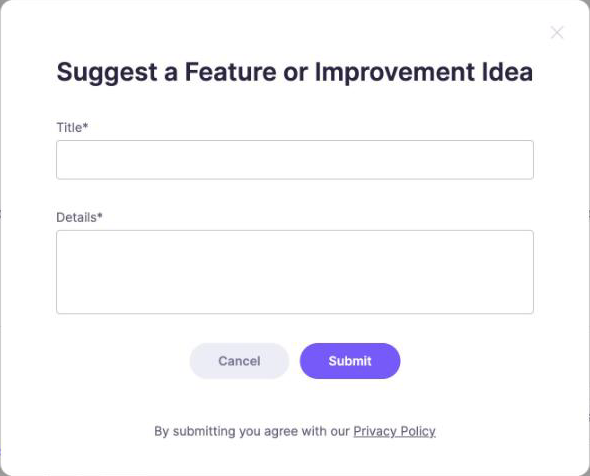
- Enter a Title and the Details.
- Click Submit.
If your request shows the wrong category, ask support to correct it.
To report a bug, click Report a bug on the same page. It opens the support page of your WebWork account.
Vote for a request
- Find the request on the Feature Requests page.
- Click the star next to its number of votes.
Click the star again to take your vote back. To narrow the list, use Search a request, select a Category, or set Sort by to Top Votes.
Follow the status of a request
Each request shows its status: New, In Progress, Completed or Not Planning. Under Submitted Requests, select a status to see only the requests that have it. When the WebWork Team has replied, the request shows a reply count, such as 1 reply; click it to read the reply.
See what WebWork is building
The Product Roadmap lists features in four groups: Coming Soon, In Development, Beta and Launched. Click a feature to read what it does and how it works. The roadmap has no voting: a request for a feature goes on the Feature Requests page.
See what has been released
The Changelog lists WebWork’s releases, newest first, each marked New, Updated or Milestone. Select a year at the top of the page to go to it. On the Product Roadmap, the Launched group lists released features too, each with a page of its own.
Was this article helpful?
Thanks for your feedback.