
Why do my screenshots show only the desktop wallpaper?
When WebWork screenshots show your wallpaper or a black image instead of your work, macOS has not granted the Screen & System Audio Recording permission to WebWork.
What happens without the permission:
- Screenshots are still taken at the set interval.
- macOS blocks the content of your windows, so only the wallpaper or a black image is captured.
This is normal macOS security. Every app that captures the screen needs this permission.
How to fix it
Step 1: Open the Screen Recording settings
When the permission is missing, WebWork opens a window titled Give WebWork permissions to work correctly. Click Open screen recording settings next to the Screen Recording row. You can also open it yourself:
- Click the Apple menu and open System Settings (System Preferences on older versions).
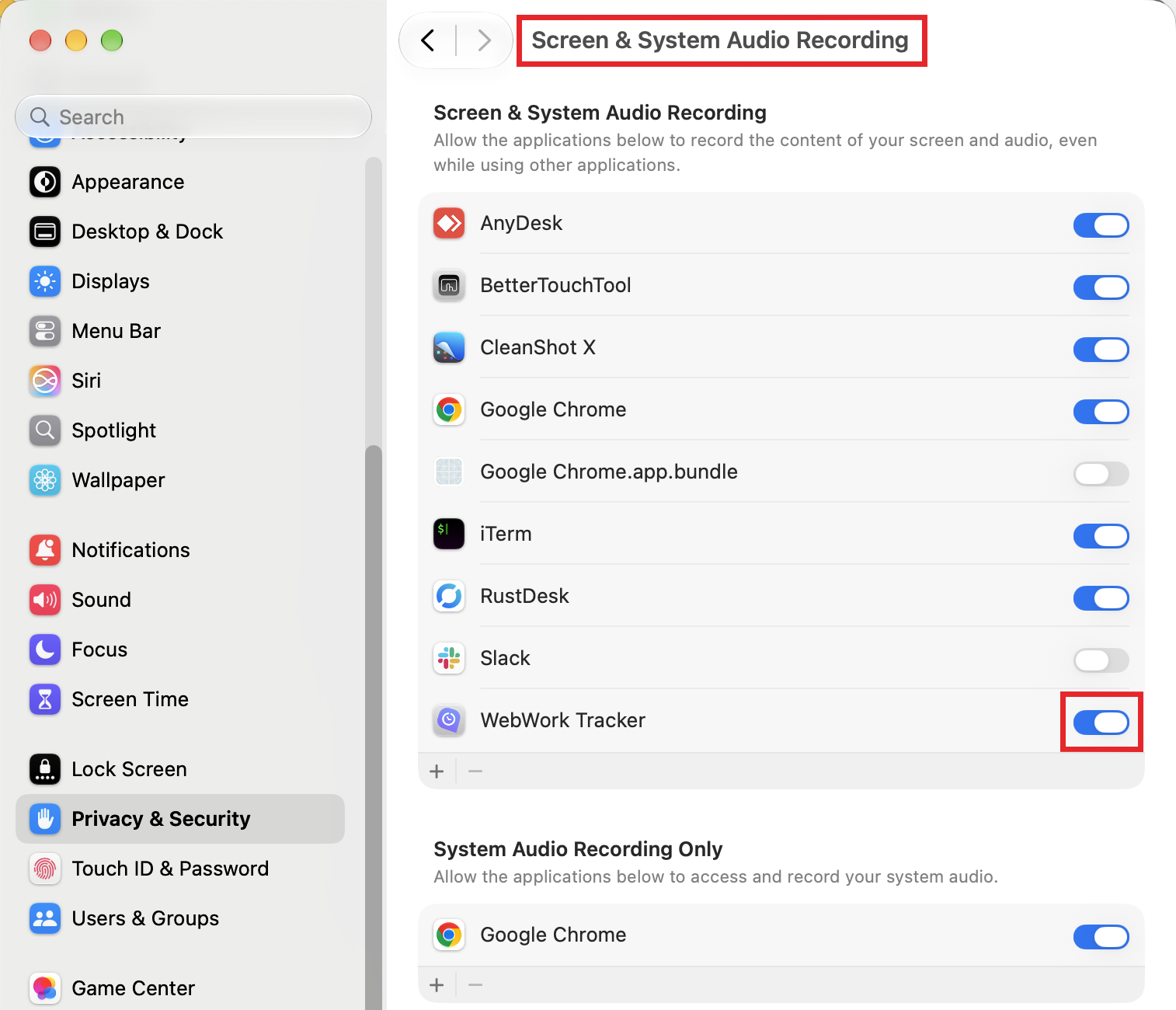
- Go to Privacy & Security > Screen & System Audio Recording (called Screen Recording on older versions).
Step 2: Turn on WebWork Tracker
- In the top list, turn on the toggle next to WebWork Tracker. The lower list, System Audio Recording Only, is not the one you need.
- If WebWork is not listed, click + and add it from the Applications folder.
Step 3: Restart WebWork
- Quit WebWork completely.
- Open it again and start tracking. macOS applies this permission only after the app restarts, and the permissions window keeps saying Denied until then.
How to check that it works
- Track for a while so WebWork takes a few screenshots.
- Open the dashboard and check that the new screenshots show your work, not the wallpaper.
Still having issues?
Two WebWork entries in the list, or the toggle is on but screenshots are still blank: an old entry can stay behind after an update. Select each WebWork entry, remove it with the − button, add the app again with +, turn it on, and restart WebWork.
The toggle is greyed out: your Mac is managed by your company. Apple does not let management profiles pre-approve Screen Recording, so ask your IT team to remove any profile that denies it for WebWork, then turn it on yourself.
macOS asks for your password: changing privacy settings needs an administrator password or Touch ID on this Mac.
Still blank after all of this: restart your Mac, and if the problem persists, send an error log to support.
Related
- macOS Permissions for WebWork Desktop Tracker: all permissions in one place.
- Keep cleanup apps from deleting WebWork Tracker data: when screenshots are missing for a period or WebWork asked you to sign in again.
Privacy: WebWork takes screenshots only while you are tracking, at the interval set in your workspace.
Need more help? Contact support with your macOS version, your WebWork version, and a description of the issue.
Was this article helpful?
Thanks for your feedback.