
Projects and Tasks
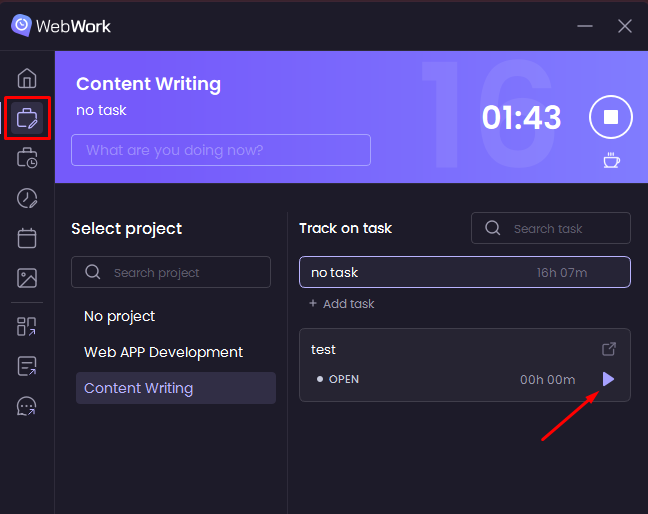
The Projects and tasks tab is where you search and select the project and task to track on.
Start the tracker with the Start button next to each task and not from the top timer.
You can track time both on projects and tasks and without a task or a project.
-
Track without project or task
To track time without selecting a project, click No project and start the tracker from no task.
-
Track on a project but no task
To track time
on a project but no task,click
the project you needand start tracking from
no task.-
Track on a project and a task
To track time on a project and a task, select the project and start the tracker with the Play button on the task you want to track on.
Project Time Details
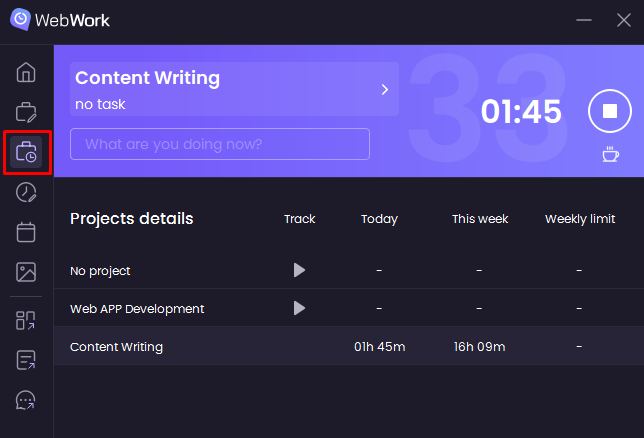
On Project time details tab, you will see tracked time and weekly limit of all projects you have access to.
Was this article helpful?
Thanks for your feedback.